<?xml version="1.0" encoding="utf-8"?><feed xmlns="http://www.w3.org/2005/Atom" ><generator uri="https://jekyllrb.com/" version="3.10.0">Jekyll</generator><link href="https://alfredzhang98.github.io/feed.xml" rel="self" type="application/atom+xml" /><link href="https://alfredzhang98.github.io/" rel="alternate" type="text/html" /><updated>2026-06-25T11:05:48+00:00</updated><id>https://alfredzhang98.github.io/feed.xml</id><title type="html">Home</title><author><name>Qingyu Zhang</name><email>qingyu.zhang.23@ucl.ac.uk</email></author><entry><title type="html">ScholarMind: AI-Powered Research Assistant for Academic Reading</title><link href="https://alfredzhang98.github.io/scholarmind/" rel="alternate" type="text/html" title="ScholarMind: AI-Powered Research Assistant for Academic Reading" /><published>2026-01-18T00:00:00+00:00</published><updated>2026-01-18T00:00:00+00:00</updated><id>https://alfredzhang98.github.io/scholarmind</id><content type="html" xml:base="https://alfredzhang98.github.io/scholarmind/"><![CDATA[<p>ScholarMind is an AI-powered research assistant designed for rigorous academic reading and literature synthesis. It analyzes scholarly articles directly from the browser, extracting precise research gaps, technical innovations, methodological details, and underlying assumptions—avoiding vague or superficial summaries.</p>

<p><img src="/images/projects/scholarmind/Presentation1.png" alt="ScholarMind" /></p>

<h2 id="why-scholarmind">Why ScholarMind</h2>

<p>ScholarMind helps researchers:</p>
<ul>
  <li>Capture structured notes from papers</li>
  <li>Compare multiple papers side-by-side</li>
  <li>Support critical literature reviews with explicit gaps, methods, and assumptions</li>
</ul>

<p>This makes it especially suitable for graduate-level research and peer-review–oriented analysis.</p>

<h2 id="demo-bilibili-in-chinese">Demo (Bilibili in Chinese)</h2>

<iframe src="//player.bilibili.com/player.html?bvid=BV1smk4BWEpu&amp;autoplay=0" scrolling="no" border="0" frameborder="no" framespacing="0" allowfullscreen="true" style="width: 100%; height: 480px;">
</iframe>

<h2 id="purchase-link-xiaohongshu">Purchase Link (Xiaohongshu)</h2>

<p><a class="btn btn-google" href="https://www.xiaohongshu.com/explore/696a60e0000000002103005e?xsec_token=AB1kPWiC2pVxbDCIaiw5Fx0EPfoHqzMNHf0NHFYoy0IyI=&amp;xsec_source=pc_user" target="_blank" rel="noopener">
	<span class="btn-icon" aria-hidden="true">↗</span>
	<span>Shop for this (in Chinese)</span>
</a></p>]]></content><author><name>Qingyu Zhang</name><email>qingyu.zhang.23@ucl.ac.uk</email></author><category term="AI" /><category term="Research" /><category term="NLP" /><category term="Literature" /><summary type="html"><![CDATA[ScholarMind is an AI-powered research assistant designed for rigorous academic reading and literature synthesis. It analyzes scholarly articles directly from the browser, extracting precise research gaps, technical innovations, methodological details, and underlying assumptions—avoiding vague or superficial summaries.]]></summary></entry><entry><title type="html">Genesis: Anatomy of a Digital Life (A Self-Evolving RAG Architecture)</title><link href="https://alfredzhang98.github.io/genesis-anatomy-of-a-digital-life/" rel="alternate" type="text/html" title="Genesis: Anatomy of a Digital Life (A Self-Evolving RAG Architecture)" /><published>2026-01-14T00:00:00+00:00</published><updated>2026-01-14T00:00:00+00:00</updated><id>https://alfredzhang98.github.io/genesis-anatomy-of-a-digital-life</id><content type="html" xml:base="https://alfredzhang98.github.io/genesis-anatomy-of-a-digital-life/"><![CDATA[<p>Genesis is designed as a bio-inspired <em>digital lifeform</em>: it executes in the world, senses outcomes, reasons with context, and continuously distills experience into reusable memory. The goal is to improve RAG robustness and make the system <em>self-evolving</em>.</p>

<p>Update note: I will progressively implement and publish this framework on GitHub (code + diagrams + docs). This post is the conceptual blueprint, and I will keep iterating on it as the implementation matures.</p>

<ul>
  <li>GitHub: <a href="https://github.com/alfredzhang98/Genesis_AGI">https://github.com/alfredzhang98/Genesis_AGI</a></li>
</ul>

<h2 id="1-the-body-execution--perception">1) The Body (Execution &amp; Perception)</h2>

<p>“The body is the container of intelligence; it interacts with the physical/digital world.”</p>

<ul>
  <li><strong>Sandbox (Docker / container)</strong>
    <ul>
      <li>Role: hands and feet</li>
      <li>What happens here: Python execution, shell commands (e.g., <code class="language-plaintext highlighter-rouge">pip install</code>), file I/O, web crawling</li>
      <li>Property: isolation and safety (protects the host from destructive actions)</li>
    </ul>
  </li>
  <li><strong>Host launcher (process supervisor)</strong>
    <ul>
      <li>Role: spinal cord / nervous system</li>
      <li>Responsibilities: keep the process alive, enforce stable runtime settings (e.g., UTF-8), route signals between brain and body (pipes for stdout)</li>
      <li>Self-healing: detects crashes and can restart/rollback to restore baseline functionality</li>
    </ul>
  </li>
  <li><strong>Sensors (perception interface)</strong>
    <ul>
      <li>Primary modality: terminal output captured from execution logs</li>
      <li>The agent “sees” results and “hears” errors by reading its own runtime traces</li>
    </ul>
  </li>
</ul>

<h2 id="2-the-brain-cognition--control">2) The Brain (Cognition &amp; Control)</h2>

<p>“The brain is a state machine (e.g., via LangGraph). The core is context synthesis and robustness control.”</p>

<ul>
  <li><strong>Planner (Prefrontal cortex)</strong>
    <ul>
      <li>Breaks down tasks, writes code, decides next actions</li>
      <li><em>Context synthesis (rolling context)</em>: each iteration fuses
        <ul>
          <li>current goal</li>
          <li>retrieved memory</li>
          <li>last generated code</li>
          <li>last error logs</li>
          <li>last analysis</li>
        </ul>
      </li>
      <li>Produces an updated prompt like: “Given error X and code Y, propose fix Z.”</li>
    </ul>
  </li>
  <li><strong>Critic (Safety / risk controller)</strong>
    <ul>
      <li>Blocks unsafe or unstable self-modification before it ships</li>
      <li>Guardrails:
        <ul>
          <li><strong>Syntax fence</strong>: parse/validate (e.g., AST) before writing code to prevent <code class="language-plaintext highlighter-rouge">SyntaxError</code></li>
          <li><strong>Logic fence</strong>: detect destructive changes (e.g., removing required init fields, breaking contracts)</li>
        </ul>
      </li>
      <li>If anything fails: feeds back failure type + cause to the Planner and forces a repair iteration</li>
    </ul>
  </li>
  <li><strong>Learner (Hippocampus)</strong>
    <ul>
      <li>Extracts durable knowledge from interaction traces</li>
      <li>Distills:
        <ul>
          <li><strong>Error lessons</strong>: “avoid this pitfall” principles</li>
          <li><strong>Successful solutions</strong>: crystallize into reusable skills</li>
        </ul>
      </li>
    </ul>
  </li>
</ul>

<h2 id="3-the-skills-capability-layer">3) The Skills (Capability Layer)</h2>

<p>“MCP-first, self-forged fallback.”</p>

<ul>
  <li><strong>MCP integration (primary)</strong>
    <ul>
      <li>Prefer calling standardized tools (filesystem, git, database, etc.) over generating fragile scripts</li>
      <li>Benefits: stability, reuse, and fast capability acquisition</li>
    </ul>
  </li>
  <li><strong>Self-forged tools (fallback)</strong>
    <ul>
      <li>Only when MCP coverage is missing (long-tail scraping patterns, custom data cleaning)</li>
      <li>Evolution path: write script → validate → generalize → package into a reusable tool/module</li>
    </ul>
  </li>
  <li><strong>Abstract capabilities (meta-skill)</strong>
    <ul>
      <li>The system generalizes from tasks (“fetch weather”) to operations (“information retrieval &amp; extraction”)</li>
      <li>Next time: first ask “Can an MCP tool do this?” otherwise “What code pattern should I generate?”</li>
    </ul>
  </li>
</ul>

<h2 id="4-memory--soul-neurodynamics-for-self-evolving-rag">4) Memory &amp; Soul (Neurodynamics for Self-Evolving RAG)</h2>

<p>“Memory is the engine of evolution. A Vector DB + Neo4j graph enables a jump from raw experience to abstract wisdom.”</p>

<h3 id="41-dual-store-memory">4.1 Dual-store memory</h3>

<ul>
  <li><strong>Vector DB (semantic recall / hippocampus)</strong>: retrieves <em>similar situations</em> via embeddings
    <ul>
      <li>Stores: task descriptions, error traces, prompt contexts (embedded)</li>
      <li>Used for: fuzzy recall (“this feels like that other problem”)</li>
    </ul>
  </li>
  <li><strong>Neo4j (knowledge pyramid / cortex)</strong>: organizes knowledge into abstraction layers</li>
</ul>

<p><strong>Knowledge pyramid</strong></p>
<ul>
  <li><strong>L0: Concrete</strong> — <code class="language-plaintext highlighter-rouge">Experience</code>, <code class="language-plaintext highlighter-rouge">Snippet</code>, <code class="language-plaintext highlighter-rouge">ErrorLog</code> (raw inputs/outputs, code, traces)</li>
  <li><strong>L1: Tags</strong> — <code class="language-plaintext highlighter-rouge">Tag</code> nodes that index and connect similar experiences</li>
  <li><strong>L2: Summaries</strong> — <code class="language-plaintext highlighter-rouge">Pattern</code> / <code class="language-plaintext highlighter-rouge">Insight</code> (natural-language best practices over a tag cluster)</li>
  <li><strong>L3: Wisdom</strong> — <code class="language-plaintext highlighter-rouge">Principle</code> / <code class="language-plaintext highlighter-rouge">Capability</code> (cross-domain rules)</li>
</ul>

<p><strong>Evolution strategy</strong></p>
<ul>
  <li>Tag extraction on each result: create new <code class="language-plaintext highlighter-rouge">Tag</code> if missing; otherwise link to existing</li>
  <li>Recursive summarization: when a tag accumulates enough experiences, summarize into/refresh <code class="language-plaintext highlighter-rouge">Pattern</code>; optionally distill upward to <code class="language-plaintext highlighter-rouge">Principle</code></li>
  <li>Quality gating: only high-confidence experiences participate in higher-level distillation</li>
</ul>

<h3 id="42-high-dimensional-memory-matrix">4.2 High-dimensional memory matrix</h3>

<p>Each memory node (N) carries a dynamic weight vector:</p>

\[W(N) = \{w_{score},\; w_{freq},\; w_{decay},\; w_{abstract},\; w_{chaos}\}\]

<p>Activation probability (for retrieval/usage) is:</p>

\[P_{\text{activation}}(N, t)=\frac{w_{score}\,\ln(1+w_{freq})\,w_{abstract}}{(1+\Delta t)^{w_{decay}}}+\mathrm{Noise}(w_{chaos})\]

<p>Where (\Delta t) is the time since the node was last <em>successfully validated</em>.</p>

<ul>
  <li><strong>(w_{decay}) (time decay)</strong>: fights path dependence; stale knowledge becomes harder to activate</li>
  <li><strong>(w_{chaos}) (exploration / entropy)</strong>: occasionally boosts non-obvious paths (e.g., (\epsilon)-greedy exploration)</li>
  <li><strong>(w_{abstract}) (abstraction level)</strong>: biases retrieval toward principles over raw snippets when appropriate</li>
</ul>

<h3 id="43-the-recursive-memory-loop">4.3 The recursive memory loop</h3>

<ol>
  <li><strong>Initialize &amp; retrieve</strong>: vector recall + graph lookup</li>
  <li><strong>Propose</strong>: Planner generates solution V1</li>
  <li><strong>Execute &amp; verify</strong> (the crucible)
    <ul>
      <li>On error: store <code class="language-plaintext highlighter-rouge">ErrorLog</code>, synthesize new context, iterate</li>
      <li>On success: store final solution as a <code class="language-plaintext highlighter-rouge">Skill</code>, distill lessons into <code class="language-plaintext highlighter-rouge">Principle</code>, update indexes</li>
    </ul>
  </li>
  <li><strong>Reuse</strong>: future tasks start from principles + templates, reducing repeated failures</li>
</ol>

<h2 id="why-this-improves-rag">Why this improves RAG</h2>

<ul>
  <li>Grounds generation in <em>actionable</em> memory (execution logs + validated skills), not just text</li>
  <li>Promotes stable reuse (MCP-first) while keeping a controlled path for new tool creation</li>
  <li>Uses decay + abstraction to reduce outdated or overfitted retrievals</li>
  <li>Adds exploration pressure to avoid local optima and enable genuine evolution</li>
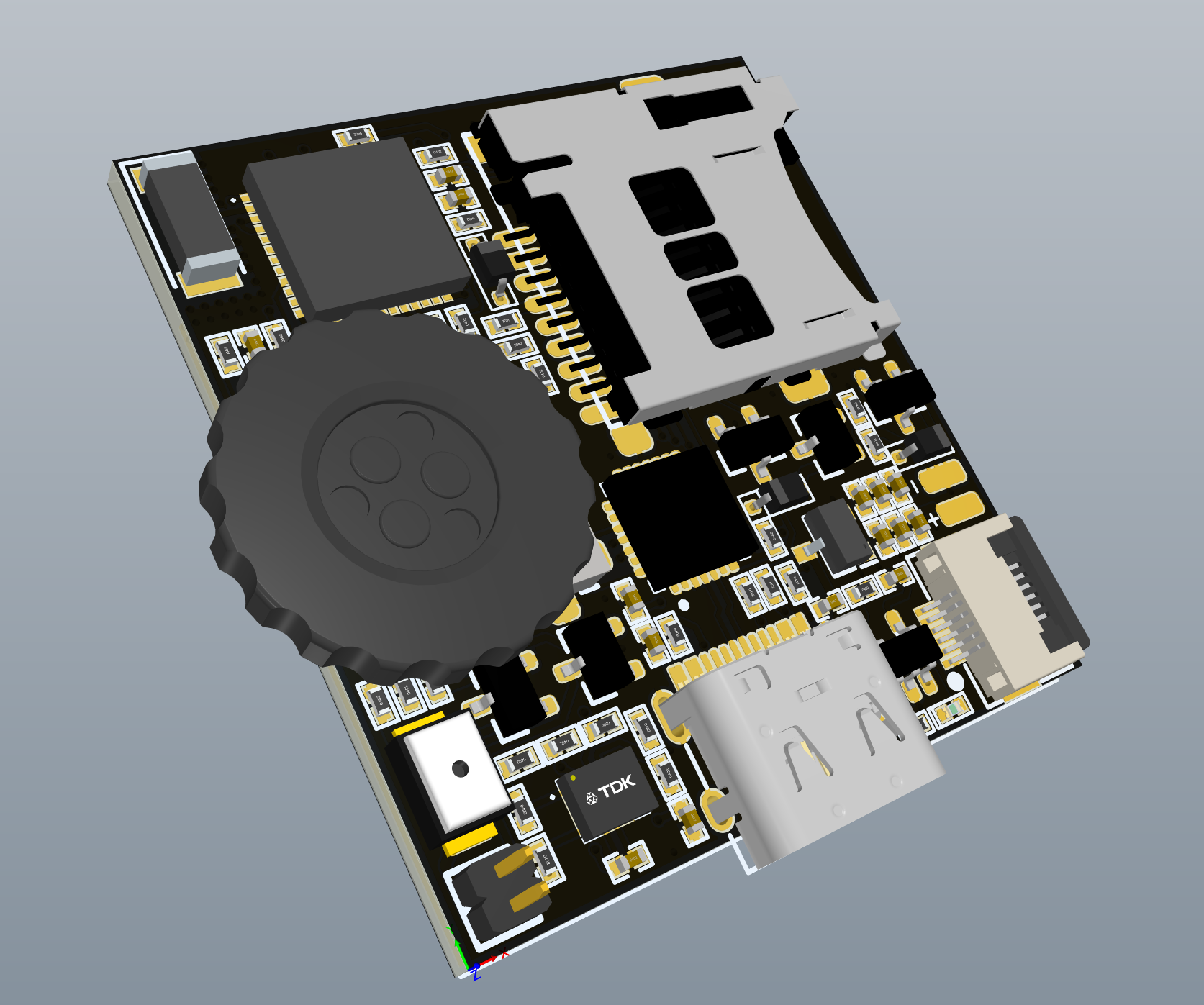
</ul>]]></content><author><name>Qingyu Zhang</name><email>qingyu.zhang.23@ucl.ac.uk</email></author><category term="AI" /><category term="Agent" /><category term="RAG" /><category term="Architecture" /><summary type="html"><![CDATA[Genesis is designed as a bio-inspired digital lifeform: it executes in the world, senses outcomes, reasons with context, and continuously distills experience into reusable memory. The goal is to improve RAG robustness and make the system self-evolving.]]></summary></entry><entry><title type="html">NeoPeak: Smart Terminal on ESP32 with LVGL (alfredzhang98/NeoPeak)</title><link href="https://alfredzhang98.github.io/neopeak-project/" rel="alternate" type="text/html" title="NeoPeak: Smart Terminal on ESP32 with LVGL (alfredzhang98/NeoPeak)" /><published>2026-01-14T00:00:00+00:00</published><updated>2026-01-14T00:00:00+00:00</updated><id>https://alfredzhang98.github.io/neopeak-project</id><content type="html" xml:base="https://alfredzhang98.github.io/neopeak-project/"><![CDATA[<p>I’m excited to announce the completion of NeoPeak, a compact smart terminal built on ESP32. This project ports the original Peak project to ESP32 ecosystem, integrating LVGL graphics library and modular firmware architecture.</p>

<p><img src="/images/projects/pcbs/neopeak.png" alt="NeoPeak" /></p>

<ul>
  <li>Repository: <a href="https://github.com/alfredzhang98/NeoPeak">https://github.com/alfredzhang98/NeoPeak</a></li>
</ul>

<h2 id="project-overview">Project Overview</h2>

<p>NeoPeak is an ultra-compact intelligent terminal featuring:</p>
<ul>
  <li><strong>LVGL Graphics Framework</strong> (v8.1) - Embedded GUI library</li>
  <li><strong>MVC Architecture</strong> - Modular firmware design</li>
  <li><strong>Message Framework</strong> - Pub/Sub event system</li>
  <li><strong>WiFi/Bluetooth</strong> - ESP32 wireless capabilities</li>
  <li><strong>3D Engine</strong> (in development) - 3D model visualization</li>
  <li><strong>Display</strong>: 240×240 16-bit color TFT, 60fps target</li>
</ul>

<h2 id="key-technical-highlights">Key Technical Highlights</h2>

<h3 id="hardware-platform-esp32-pico-v3-02">Hardware Platform: ESP32-Pico-V3-02</h3>

<p>MCU selection requires:</p>
<ul>
  <li>Main frequency &gt; 150MHz</li>
  <li>RAM ≥ 200KB (112KB for LVGL buffer)</li>
  <li>SPI speed ≥ 50Mbps (for 60fps refresh)</li>
</ul>

<p>ESP32-Pico-V3-02 chosen for:</p>
<ul>
  <li>Dual-core, built-in WiFi/Bluetooth</li>
  <li>Arduino ecosystem friendly</li>
  <li>Cost and availability</li>
</ul>

<h3 id="firmware-architecture">Firmware Architecture</h3>

<p>Three-layer design:</p>
<ul>
  <li><strong>HAL</strong>: Low-level drivers, sensors, MCU peripherals</li>
  <li><strong>Framework</strong>: LVGL display, page lifecycle, message system</li>
  <li><strong>Application</strong>: UI pages and business logic</li>
</ul>

<h3 id="display-integration">Display Integration</h3>

<ul>
  <li>Driver: ST7789 (240×240, 16-bit) via TFT_eSPI</li>
  <li>SPI clock: &gt; 50MHz (IOMUX required for maximum speed)</li>
  <li>LVGL buffer: 112KB, dynamically allocated</li>
  <li>Memory: ESP32’s fragmented 300KB dataRAM requires careful allocation order</li>
</ul>

<h3 id="page-scheduling">Page Scheduling</h3>

<p>Inspired by iOS ViewController, implements structured page lifecycle:</p>
<ul>
  <li><strong>onViewLoad</strong>: Initialize views</li>
  <li><strong>onViewDidAppear</strong>: Transition animations</li>
  <li><strong>onViewWillDisappear/onViewDidDisappear</strong>: Cleanup</li>
  <li><strong>onViewDidUnload</strong>: Resource cleanup</li>
</ul>

<h3 id="message-framework">Message Framework</h3>

<p>Pub/Sub system for sensor data and events:</p>
<ul>
  <li>HAL publishes sensor events (GPS, IMU, barometer)</li>
  <li>Data processors subscribe and compute metrics</li>
  <li>UI pages subscribe to processed data</li>
  <li>Reactive updates on event changes</li>
</ul>

<h3 id="key-implementation-details">Key Implementation Details</h3>

<ul>
  <li><strong>LVGL Porting</strong>: Display/File/Input port implementations</li>
  <li><strong>SPI Config</strong>: HSPI MISO pin remap to GPIO26 (avoid GPIO12 flash boot conflict)</li>
  <li><strong>Memory</strong>: Dynamic allocation for display buffer, careful initialization order</li>
  <li><strong>File System</strong>: <code class="language-plaintext highlighter-rouge">lv_fs_drv_t</code> must be static/global (not stack-allocated)</li>
</ul>

<h2 id="references">References</h2>

<ul>
  <li><a href="https://github.com/peng-zhihui/Peak">Peak</a> - Original hardware and firmware</li>
  <li><a href="https://github.com/FASTSHIFT/X-Track">X-Track</a> - Framework architecture and LVGL integration</li>
  <li><a href="https://github.com/lvgl/lvgl">LVGL</a> - Graphics library</li>
  <li><a href="https://github.com/Bodmer/TFT_eSPI">TFT_eSPI</a> - SPI display driver</li>
  <li><a href="https://docs.espressif.com/">ESP32 Docs</a> - Microcontroller resources</li>
</ul>

<p>Check out the repository and contribute!</p>]]></content><author><name>Qingyu Zhang</name><email>qingyu.zhang.23@ucl.ac.uk</email></author><category term="Hardware" /><category term="AIOT" /><category term="GUI" /><summary type="html"><![CDATA[I’m excited to announce the completion of NeoPeak, a compact smart terminal built on ESP32. This project ports the original Peak project to ESP32 ecosystem, integrating LVGL graphics library and modular firmware architecture.]]></summary></entry><entry><title type="html">atom_aiot: AIoT Hardware Research Notes (alfredzhang98/atom_aiot)</title><link href="https://alfredzhang98.github.io/aiot_github/" rel="alternate" type="text/html" title="atom_aiot: AIoT Hardware Research Notes (alfredzhang98/atom_aiot)" /><published>2025-11-03T00:00:00+00:00</published><updated>2025-11-03T00:00:00+00:00</updated><id>https://alfredzhang98.github.io/aiot_github</id><content type="html" xml:base="https://alfredzhang98.github.io/aiot_github/"><![CDATA[<p>This post collects my notes and experiments on AIoT (Artificial Intelligence of Things) hardware. Code, hardware files, and bring‑up logs are maintained in the open-source repository atom_aiot for reuse and future expansion.</p>

<ul>
  <li>Repository:
    <ul>
      <li>GitHub: <a href="https://github.com/alfredzhang98/atom_aiot">https://github.com/alfredzhang98/atom_aiot</a></li>
    </ul>
  </li>
</ul>

<h2 id="what-this-repo-is-for">What this repo is for</h2>

<p>Hands-on “edge intelligence + hardware,” including:</p>
<ul>
  <li>Power‑up (“bring‑up”) of common development boards and peripheral drivers (UART, I2C/SPI, timers, PWM, DMA, ADC, etc.)</li>
  <li>Sensor/actuator integration and debugging (IMU, barometer, motors/servos, displays, radios, etc.)</li>
  <li>Reusable firmware scaffolding and drivers (primarily C/C++)</li>
  <li>Measurements and tuning logs (power, timing, link robustness, debouncing and filtering)</li>
</ul>

<h2 id="repository-structure-growing">Repository structure (growing)</h2>

<ul>
  <li><code class="language-plaintext highlighter-rouge">iot_developboards/</code>: PCB development boards hardware folder
    <ul>
      <li>Schematics, layouts (e.g., Altium), BOM, test points, power domains</li>
      <li>Board bring‑up notes, self‑test checklist, minimal working examples</li>
    </ul>
  </li>
  <li><code class="language-plaintext highlighter-rouge">iot_items/</code>: Interface code folder
    <ul>
      <li>Peripheral interface/driver code (GPIO, UART, I2C, SPI, PWM, ADC, DMA)</li>
      <li>Device modules (IMU, pressure/force, displays, motors/servos, radios)</li>
      <li>Small reference demos with comments</li>
    </ul>
  </li>
</ul>]]></content><author><name>Qingyu Zhang</name><email>qingyu.zhang.23@ucl.ac.uk</email></author><category term="Hardware" /><category term="AIoT" /><summary type="html"><![CDATA[This post collects my notes and experiments on AIoT (Artificial Intelligence of Things) hardware. Code, hardware files, and bring‑up logs are maintained in the open-source repository atom_aiot for reuse and future expansion.]]></summary></entry><entry><title type="html">PyTorch Study Repo: Quick Tour and Index (alfredzhang98/PyTorch_study)</title><link href="https://alfredzhang98.github.io/study-pytorch/" rel="alternate" type="text/html" title="PyTorch Study Repo: Quick Tour and Index (alfredzhang98/PyTorch_study)" /><published>2025-10-28T00:00:00+00:00</published><updated>2025-10-28T00:00:00+00:00</updated><id>https://alfredzhang98.github.io/study-pytorch</id><content type="html" xml:base="https://alfredzhang98.github.io/study-pytorch/"><![CDATA[<p>This post summarizes my learning repository “PyTorch_study” based on notes and examples from the book/course “PyTorch 深度学习实战”, so I can quickly review it later.</p>

<ul>
  <li>Repo links:
    <ul>
      <li>GitHub: <a href="https://github.com/alfredzhang98/PyTorch_study">https://github.com/alfredzhang98/PyTorch_study</a></li>
      <li>README: <a href="https://github.com/alfredzhang98/PyTorch_study/blob/main/Readme.md">https://github.com/alfredzhang98/PyTorch_study/blob/main/Readme.md</a></li>
    </ul>
  </li>
</ul>

<h2 id="repository-structure">Repository structure</h2>

<p>As described in the README, the repo is organized into three parts:</p>

<p>1) Basic: PyTorch prerequisites and fundamentals (NumPy basics, Tensor basics and advanced usage)
2) Training: Building and training neural networks with PyTorch (autograd, nn module, optim module, and the end-to-end training loop)
3) Application: Practical projects (e.g., computer vision, LSTM motion prediction)</p>

<p>Currently, the Basic, Training and Application parts are complete.</p>

<h2 id="basic">Basic</h2>

<ul>
  <li>Environment sanity check
    <ul>
      <li>00_test.ipynb: <a href="https://github.com/alfredzhang98/PyTorch_study/blob/main/Basic/00_test.ipynb">https://github.com/alfredzhang98/PyTorch_study/blob/main/Basic/00_test.ipynb</a>
        <ul>
          <li>Print PyTorch/CUDA versions and GPU info; quick CPU vs GPU timing.</li>
        </ul>
      </li>
    </ul>
  </li>
  <li>NumPy basics
    <ul>
      <li>01_numpy.ipynb: <a href="https://github.com/alfredzhang98/PyTorch_study/blob/main/Basic/01_numpy.ipynb">https://github.com/alfredzhang98/PyTorch_study/blob/main/Basic/01_numpy.ipynb</a>
        <ul>
          <li>Array creation; shape/ndim; reshape; arange/linspace; axis-wise reductions; simple plotting.</li>
        </ul>
      </li>
    </ul>
  </li>
  <li>NumPy for images
    <ul>
      <li>02_numpy_pics.ipynb: <a href="https://github.com/alfredzhang98/PyTorch_study/blob/main/Basic/02_numpy_pics.ipynb">https://github.com/alfredzhang98/PyTorch_study/blob/main/Basic/02_numpy_pics.ipynb</a>
        <ul>
          <li>PIL/OpenCV interop; channel split/merge; argsort, top-k, and mask generation mini tasks.</li>
        </ul>
      </li>
    </ul>
  </li>
  <li>Tensor basics and advanced
    <ul>
      <li>03_tensor.ipynb: <a href="https://github.com/alfredzhang98/PyTorch_study/blob/main/Basic/03_tensor.ipynb">https://github.com/alfredzhang98/PyTorch_study/blob/main/Basic/03_tensor.ipynb</a>
        <ul>
          <li>Scalar/vector/matrix concepts; core Tensor operations.</li>
        </ul>
      </li>
      <li>04_tensor_advanced.ipynb: <a href="https://github.com/alfredzhang98/PyTorch_study/blob/main/Basic/04_tensor_advanced.ipynb">https://github.com/alfredzhang98/PyTorch_study/blob/main/Basic/04_tensor_advanced.ipynb</a>
        <ul>
          <li>Indexing/index_select; unbind; chunk/split; and more practical snippets.</li>
        </ul>
      </li>
    </ul>
  </li>
</ul>

<h2 id="training">Training</h2>

<ul>
  <li>Data pipeline
    <ul>
      <li>05_dataset_dataload.ipynb: <a href="https://github.com/alfredzhang98/PyTorch_study/blob/main/Training/05_dataset_dataload.ipynb">https://github.com/alfredzhang98/PyTorch_study/blob/main/Training/05_dataset_dataload.ipynb</a>
        <ul>
          <li>Dataset/DataLoader; MNIST example; transform parameters explained.</li>
        </ul>
      </li>
    </ul>
  </li>
  <li>Vision preprocessing
    <ul>
      <li>06_torchvision.ipynb: <a href="https://github.com/alfredzhang98/PyTorch_study/blob/main/Training/06_torchvision.ipynb">https://github.com/alfredzhang98/PyTorch_study/blob/main/Training/06_torchvision.ipynb</a>
        <ul>
          <li>torchvision.transforms: Resize/CenterCrop/RandomCrop/FiveCrop/Flip/Normalize/RandomErasing; PIL ↔ Tensor conversions.</li>
        </ul>
      </li>
    </ul>
  </li>
  <li>Pretrained models and fine-tuning
    <ul>
      <li>07_models.ipynb: <a href="https://github.com/alfredzhang98/PyTorch_study/blob/main/Training/07_models.ipynb">https://github.com/alfredzhang98/PyTorch_study/blob/main/Training/07_models.ipynb</a>
        <ul>
          <li>torchvision.models (e.g., GoogLeNet); transfer learning; utils.make_grid/save_image visualization.</li>
        </ul>
      </li>
    </ul>
  </li>
  <li>Convolution and visualization
    <ul>
      <li>08_conv01.ipynb: <a href="https://github.com/alfredzhang98/PyTorch_study/blob/main/Training/08_conv01.ipynb">https://github.com/alfredzhang98/PyTorch_study/blob/main/Training/08_conv01.ipynb</a>
        <ul>
          <li>Conv2d parameters (kernel/stride/padding/dilation/groups/bias); manual convolution; dilated conv; channel-wise pseudo-color visualization.</li>
        </ul>
      </li>
    </ul>
  </li>
  <li>Loss functions
    <ul>
      <li>10_loss.ipynb: <a href="https://github.com/alfredzhang98/PyTorch_study/blob/main/Training/10_loss.ipynb">https://github.com/alfredzhang98/PyTorch_study/blob/main/Training/10_loss.ipynb</a>
        <ul>
          <li>Squared loss, MSE/MAE recap and derivation snippets.</li>
        </ul>
      </li>
    </ul>
  </li>
  <li>Autograd and gradients
    <ul>
      <li>11_grad.ipynb: <a href="https://github.com/alfredzhang98/PyTorch_study/blob/main/Training/11_grad.ipynb">https://github.com/alfredzhang98/PyTorch_study/blob/main/Training/11_grad.ipynb</a>
        <ul>
          <li>Feedforward networks; derivatives/partials and an intuition for autograd.</li>
        </ul>
      </li>
    </ul>
  </li>
  <li>Optimization methods
    <ul>
      <li>12_optimise.ipynb: <a href="https://github.com/alfredzhang98/PyTorch_study/blob/main/Training/12_optimise.ipynb">https://github.com/alfredzhang98/PyTorch_study/blob/main/Training/12_optimise.ipynb</a>
        <ul>
          <li>BGD/SGD/Mini-batch; Momentum, RMSProp, Adam; NumPy-only demos (shuffle indices, batch splits, parameter updates); common pitfalls and references.</li>
        </ul>
      </li>
    </ul>
  </li>
  <li>Training visualization
    <ul>
      <li>14_visual.ipynb: <a href="https://github.com/alfredzhang98/PyTorch_study/blob/main/Training/14_visual.ipynb">https://github.com/alfredzhang98/PyTorch_study/blob/main/Training/14_visual.ipynb</a>
        <ul>
          <li>wandb/tensorboard usage; SummaryWriter for logging loss; suggested log directory structure and commands.</li>
        </ul>
      </li>
    </ul>
  </li>
  <li>Speeding up training and distributed
    <ul>
      <li>15_train_fast.ipynb: <a href="https://github.com/alfredzhang98/PyTorch_study/blob/main/Training/15_train_fast.ipynb">https://github.com/alfredzhang98/PyTorch_study/blob/main/Training/15_train_fast.ipynb</a>
        <ul>
          <li>Single-/multi-GPU and multi-node setups; nccl/gloo backends; init_process_group/env vars; enumerating devices; DDP best practices.</li>
        </ul>
      </li>
    </ul>
  </li>
</ul>

<h2 id="application">Application</h2>

<ul>
  <li>Image Classification
    <ul>
      <li>16_image_classification_basic.ipynb: <a href="https://github.com/alfredzhang98/PyTorch_study/blob/main/Application/16_image_classification_basic.ipynb">https://github.com/alfredzhang98/PyTorch_study/blob/main/Application/16_image_classification_basic.ipynb</a>
        <ul>
          <li>Basics of image classification tasks.</li>
        </ul>
      </li>
      <li>17_image_cllssification_code.ipynb: <a href="https://github.com/alfredzhang98/PyTorch_study/blob/main/Application/17_image_cllssification_code.ipynb">https://github.com/alfredzhang98/PyTorch_study/blob/main/Application/17_image_cllssification_code.ipynb</a>
        <ul>
          <li>Practical code examples for image classification.</li>
        </ul>
      </li>
    </ul>
  </li>
  <li>Image Segmentation
    <ul>
      <li>18_image_segmentation_basic.ipynb: <a href="https://github.com/alfredzhang98/PyTorch_study/blob/main/Application/18_image_segmentation_basic.ipynb">https://github.com/alfredzhang98/PyTorch_study/blob/main/Application/18_image_segmentation_basic.ipynb</a>
        <ul>
          <li>Introduction to image segmentation concepts.</li>
        </ul>
      </li>
      <li>19_image_segmentation_code.ipynb: <a href="https://github.com/alfredzhang98/PyTorch_study/blob/main/Application/19_image_segmentation_code.ipynb">https://github.com/alfredzhang98/PyTorch_study/blob/main/Application/19_image_segmentation_code.ipynb</a>
        <ul>
          <li>Implementation of segmentation models (UNet etc.) and training scripts.</li>
          <li>19_image_segmentation_train.py: Training script for image segmentation.</li>
          <li>19_image_segmentation_val.py: Validation script for image segmentation.</li>
        </ul>
      </li>
    </ul>
  </li>
  <li>NLP Basics
    <ul>
      <li>20_nlp_basic.ipynb: <a href="https://github.com/alfredzhang98/PyTorch_study/blob/main/Application/20_nlp_basic.ipynb">https://github.com/alfredzhang98/PyTorch_study/blob/main/Application/20_nlp_basic.ipynb</a>
        <ul>
          <li>Natural Language Processing fundamentals.</li>
        </ul>
      </li>
      <li>21_nlp_attention.ipynb: <a href="https://github.com/alfredzhang98/PyTorch_study/blob/main/Application/21_nlp_attention.ipynb">https://github.com/alfredzhang98/PyTorch_study/blob/main/Application/21_nlp_attention.ipynb</a>
        <ul>
          <li>Understanding Attention mechanisms.</li>
        </ul>
      </li>
    </ul>
  </li>
  <li>Advanced NLP Applications
    <ul>
      <li>22_lstm_emotion.ipynb: <a href="https://github.com/alfredzhang98/PyTorch_study/blob/main/Application/22_lstm_emotion.ipynb">https://github.com/alfredzhang98/PyTorch_study/blob/main/Application/22_lstm_emotion.ipynb</a>
        <ul>
          <li>Emotion classification using LSTM.</li>
          <li>22_lstm_emotion.py: Python script version of the LSTM emotion classification.</li>
        </ul>
      </li>
      <li>23_bert_emotion.ipynb: <a href="https://github.com/alfredzhang98/PyTorch_study/blob/main/Application/23_bert_emotion.ipynb">https://github.com/alfredzhang98/PyTorch_study/blob/main/Application/23_bert_emotion.ipynb</a>
        <ul>
          <li>Emotion classification using BERT.</li>
        </ul>
      </li>
      <li>24_bart_abstract.ipynb: <a href="https://github.com/alfredzhang98/PyTorch_study/blob/main/Application/24_bart_abstract.ipynb">https://github.com/alfredzhang98/PyTorch_study/blob/main/Application/24_bart_abstract.ipynb</a>
        <ul>
          <li>Text summarization/abstract generation using BART.</li>
          <li>24_bart_main.py: Main execution script for BART summarization.</li>
          <li>24_bert_test.py: Test script for BERT/BART models.</li>
        </ul>
      </li>
    </ul>
  </li>
</ul>

<h2 id="how-to-use">How to use</h2>

<ul>
  <li>Browse online: click the GitHub links above to open each .ipynb.</li>
  <li>Run locally: create a fresh Conda env; install PyTorch, torchvision, numpy, matplotlib, Pillow, etc.; then open in Jupyter or VS Code.</li>
</ul>

<h2 id="next-steps">Next steps</h2>

<p>The learning phase is now complete. The next major update will focus on implementing modern architectures from scratch:</p>

<ul>
  <li><strong>Hand-rolled Implementations</strong>: Implementing Transformer, ViT (Vision Transformer), and other key frameworks from scratch to understand their inner workings.</li>
  <li><strong>Minimal Testing</strong>: Performing minimal testing to verify the correctness of these implementations.</li>
  <li>Keep refining training/tuning/visualization patterns into reusable templates.</li>
</ul>

<p>If you’re also learning PyTorch, feel free to star and discuss!</p>]]></content><author><name>Qingyu Zhang</name><email>qingyu.zhang.23@ucl.ac.uk</email></author><category term="Study" /><category term="ML" /><summary type="html"><![CDATA[This post summarizes my learning repository “PyTorch_study” based on notes and examples from the book/course “PyTorch 深度学习实战”, so I can quickly review it later.]]></summary></entry><entry><title type="html">Claim: This site and key changes versus the original template</title><link href="https://alfredzhang98.github.io/claim-and-changes/" rel="alternate" type="text/html" title="Claim: This site and key changes versus the original template" /><published>2025-09-10T00:00:00+00:00</published><updated>2025-09-10T00:00:00+00:00</updated><id>https://alfredzhang98.github.io/claim-and-changes</id><content type="html" xml:base="https://alfredzhang98.github.io/claim-and-changes/"><![CDATA[<p>This post documents, in English, the changes made on top of AcademicPages/Minimal Mistakes, the rationale, and compatibility measures. It also credits the original work.</p>

<p>Acknowledgment &amp; Reference</p>
<ul>
  <li>The site is based on AcademicPages (MIT). Repository: <a href="https://github.com/academicpages/academicpages.github.io">link</a></li>
  <li>The theme is Minimal Mistakes (MIT). Many thanks to the authors and community.</li>
</ul>

<p>Why these changes</p>
<ul>
  <li>Better project presentation for research: ordering, date ranges, ongoing highlights, and readable funding.</li>
  <li>Bilingual browsing (EN/中文) while preserving the correct author name across translations.</li>
  <li>Layout stability across very short and very long pages; avoid footer “floating” and translation UI layout shifts.</li>
</ul>

<p>Key changes (features and UX)</p>
<ul>
  <li>Projects index and cards
    <ul>
      <li>Sorting: primary by front matter <code class="language-plaintext highlighter-rouge">order</code> (ascending), then by date (descending).</li>
      <li>Ongoing detection based on start/end (supports <code class="language-plaintext highlighter-rouge">present/now</code>); subtle green glow on ongoing cards.</li>
      <li>Media area fixed at 5:3; SVG covers use contain (no crop, full view).</li>
      <li>Tighter preview text and spacing.</li>
      <li>Date range normalized as “YYYY.MM — Until now/End time”.</li>
    </ul>
  </li>
  <li>Funding rendering
    <ul>
      <li>Funding shown as non-wrapping chips on cards and project pages.</li>
      <li>On cards, show up to two chips; overflow summarized as “+N”, with a tooltip listing the rest.</li>
    </ul>
  </li>
  <li>Publications UX
    <ul>
      <li>Citation lines standardized (IEEE-like) with a copy-to-clipboard button.</li>
      <li>Small spacing/presentation refinements; no noisy “read more” by default.</li>
    </ul>
  </li>
  <li>Content authoring
    <ul>
      <li>PhD project: concise overview and research thrusts; links to the project website and transfer report; normalized dates/tags/cover.</li>
      <li>RA (insole) project: summary written; contributions and future work clarified; images added; paper link included; metadata normalized.</li>
      <li>RA (stimulator) project: limited to confirmed facts (stimulation, wireless charging, BLE); contributions summarized; PCB image included.</li>
    </ul>
  </li>
  <li>Language switching and Chinese fit
    <ul>
      <li>EN / 中文 switch at top-right (Google Translate underneath); choice persisted via localStorage.</li>
      <li>Tag “RA” mapped to the Chinese label “研究助理”.</li>
      <li>Author name enforced: “Qingyu Zhang” ↔ “张清宇”; auto-fixes common mistranslations (e.g., “张庆余”, “Qinyu Zhang”).</li>
      <li>
        <table>
          <tbody>
            <tr>
              <td>The switch labels are protected from translation and auto-reset to “EN</td>
              <td>中文”.</td>
            </tr>
          </tbody>
        </table>
      </li>
      <li>A MutationObserver catches late DOM changes from the translator to keep labels/names correct.</li>
    </ul>
  </li>
  <li>Layout and stability
    <ul>
      <li>Force-hide Google Translate banner/iframes to prevent layout shifts.</li>
      <li>Footer reworked to a flex-based sticky layout:
        <ul>
          <li>When content is short, the footer sticks to the bottom.</li>
          <li>When content is long, it follows naturally after content.</li>
          <li>No absolute positioning; avoids “floating in the middle”.</li>
        </ul>
      </li>
      <li>CV page: stays centered and at a sensible width even with <code class="language-plaintext highlighter-rouge">author_profile: false</code>; the PDF viewer has a fallback link.</li>
    </ul>
  </li>
</ul>

<p>Compatibility and fallbacks</p>
<ul>
  <li>Language switching applies run-time text corrections only; it does not modify source Markdown.</li>
  <li>If embedded PDF is blocked, the CV page provides an “Open in new tab” link.</li>
  <li>Sticky footer uses <code class="language-plaintext highlighter-rouge">body{display:flex;min-height:100vh;flex-direction:column}</code> and <code class="language-plaintext highlighter-rouge">#main{flex:1}</code>; works with and without the sidebar.</li>
</ul>

<p>Key files (selected)</p>
<ul>
  <li>Pages and layouts:
    <ul>
      <li><code class="language-plaintext highlighter-rouge">_pages/projects.html</code> (projects index, ordering/filtering, funding on cards)</li>
      <li><code class="language-plaintext highlighter-rouge">_layouts/cv-layout.html</code> (CV layout with centered title and content area)</li>
      <li><code class="language-plaintext highlighter-rouge">_layouts/single.html</code>, <code class="language-plaintext highlighter-rouge">_layouts/archive.html</code> (based on Minimal Mistakes structure)</li>
    </ul>
  </li>
  <li>Styles (Sass):
    <ul>
      <li><code class="language-plaintext highlighter-rouge">_sass/layout/_custom_overrides.scss</code> (project cards, funding chips, PDF viewer, sticky-footer structure)</li>
      <li><code class="language-plaintext highlighter-rouge">_sass/layout/_footer.scss</code> (flex-based footer; no floats)</li>
      <li><code class="language-plaintext highlighter-rouge">_sass/layout/_navigation.scss</code> (language switch styling and interaction)</li>
    </ul>
  </li>
  <li>Scripts:
    <ul>
      <li><code class="language-plaintext highlighter-rouge">assets/js/lang-switch.js</code> (load translator, hide banner, switch logic, name correction, tag mapping, delayed fixes)</li>
      <li><code class="language-plaintext highlighter-rouge">_includes/scripts.html</code> (script includes)</li>
    </ul>
  </li>
</ul>

<p>Development &amp; deployment</p>
<ul>
  <li>Docker files are provided for quick local preview (Docker Desktop + docker compose).</li>
  <li>Ruby/Jekyll workflows also remain viable, consistent with AcademicPages.</li>
</ul>

<p>Licensing &amp; attribution</p>
<ul>
  <li>MIT licenses from AcademicPages and Minimal Mistakes are preserved, along with acknowledgments.</li>
  <li>This document is an incremental changelog over the original template to help future maintainers.</li>
</ul>

<p>Notes to readers</p>
<ul>
  <li>If you see translation-induced issues on specific pages, please open an issue with page URL and browser details.</li>
</ul>

<p>This post publicly claims authorship for the current site implementation and summarizes deltas from the original template.</p>]]></content><author><name>Qingyu Zhang</name><email>qingyu.zhang.23@ucl.ac.uk</email></author><category term="Changelog" /><summary type="html"><![CDATA[This post documents, in English, the changes made on top of AcademicPages/Minimal Mistakes, the rationale, and compatibility measures. It also credits the original work.]]></summary></entry></feed>